Tuesday, April 12, 2011
Algebra without Arithmetic
So this problem was suggested by Don Cohen ("The Math Man") who suggested we look at Take a look at Prelude to Mathematics by W.W. Sawyer p.98+ Algebra without Arithmetic, The Group of the Rectangle on the Natural Math mailing list.
You could easily add a Triangle or any other shape to this project in Etoys (you would need to use a graphic object as those are the only objects that you can currently "flip" in Etoys 4.1)
One idea I had was to color the rectangle (based upon position of the inner square) and add an arrow to help kids visually compare and identify equality.
As always suggestions welcome, post a comment below.


Monday, April 11, 2011
Scaling as a Multiplication/Division model.
Rebecca Hanson had a post on "Developing a scaling primitive in multiplication and division" so in response I decided to play around with some ideas for exploring scaling within Etoys. The first two involve number lines, the third involves scaling width and can be used in conjunction with a number line (or not) and the fourth, was inspired by on of Richard Feynam's stories of learning from his dad.
That said I still think my two favorites are "Step away from the computer and no one gets hurt" activities.
1) Shadow puppets on the wall. Seeing the effects of changing the distance of the hands from the wall. This might be work better with a couple kids telling a story. One example being the "killer rabbit" coming closer and closer and attacking (for you Monty Python fans).
2) Have one child stand at the far end of the room and have kids hold one hand with their arm straight out and "place" the child's head between their thumb and index finger. Then have the child walk towards the kids and and keep the child's head between their thumb and index finger. You could have them measure the distance between the child and the kids and also the distance between thumb and index finger. I also like this viewing cars or a train far away coming towards you, but this could be a bit dangerous and my insurance agent warns against recommending it ;)
If you have any more ideas please let me know.
Wednesday, April 6, 2011
Ways To Multiply
This post was inspired by Natural Math's "Multiplication Models" Poster. The idea is to have kids create/record there ideas and observations. They can build, record and publish their models in Etoys.
They can also observe and create models in the physical world and record them with a camera for import into Etoys.
One idea is that you start simply with ways to name a number 1 to 10. Then move them on to creating and recording models of addition, subtraction, multiplication, division, fractions, etc.
They can post their Portfolio on the Web with Flikr, Picasa, Blog posts etc.
I have created a number of tools in Etoys to help facilitate the process.
Visualize Multiplication - the project used to create these slide (its just a layout in a book)
- Flap Image Export 1 - a tool to export images from Etoys (blog entry)
OOO Tools - a tool to create arithmetic operations (blog entry
)
- MM Artifacts - a tool to create fraction with M&Ms (you could edit to use other images)
- Multiply Combo - a fun tool to create Combinations of images
- Fraction Bars & Num line - a set of Cuisenaire Rods and a number line you can unitize
- Balance Scale - a balance scale where kids can create their own problems and experiment.
- Guess My Rule - a Rube Goldberg function machine, kids can use this as a base to build their own Rube Goldberg function machines.
- Name That Number - a Bingo Game where kids and teachers can use their "Multiple Ways to Visually name a number" to create Bingo Cards and a set of Bingo Balls.
Saturday, April 2, 2011
Export Images from Etoys
Export a images from your Etoys projects simply and easily. I have created two tools (with help from Bert for some initial Squeak scripting, its amazing what you can do with Squeak, we really need to find a way to transition kids from the tile scripting to writing Squeak).

 The First Tool allows you to export a PNG image of the costume (what a player looks like on the screen) of any object (including playfields, so you get an image of the playfield and everythin in it!). Simply click on the box with a black dot (its a simple watcher for a player variable) and your cursor will turn into a cross hair (large thin plus sign), then click on the object for which you want a picture. Then you can use the objects Name as the file name (by clicking on
You can also export images for each page in a book, by using the "Select Book" tool and clicking on a book (note you need to click on the edge of a book or you will get one of the objects inside it, if you do not select a book an exception will be thrown when you try to save the images). I will fix this (as soon as I get some more Squeak help from etoys mailing list ;)
I created two versions of the tool (actually three, but only two are Etoys projects).
 |
| Image Tools Quick Guide |
The first is a Quick Guide you can install on your system (more on how you can create your own Quick Guides later). Check the comments on the squeakland.org post for how to install the Quick Guide. I need to document more and will do so in a future Blog post and in the Etoys Manual.
The second has the tools in a flap that you can easily share on all projects.
Flaps can be shared by all projects by getting the Flap's Halo, clicking on the menu and checking the box next to "shared by all projects". I made this simple for you in this project, by having the menu open when you open the project.
 |
I created the first draft by exporting from Etoys and creating the first draft of this directly from Picasa. I eventually want to get to the point where we can post directly from Etoys (at least a good draft). Also we should be able to post from Etoys to Facebook, Blogger, Twitter (although as you can tell I see no point in saying anything in less than 140 characters ;) . . .
Wednesday, March 30, 2011
Area Blocks - A Tool For Teachers (and Learners)
This post started as an OER Glue test (a promising new tool to "Gather content, stitch it together, and engage learners w/o reinventing the wheel."). But I figured I'd add some educational content as well.
Tuesday, March 29, 2011
Order of Operations (Beyond PEMDAS) - What to do first
 |
| OOO Tools |
 |
| Etoy Project Here |
Tuesday, March 15, 2011
Pi: The Archimedes way: Can 6th graders figure it out themselves?
Why I think this is possible: I created a project in Etoys (Circle Explorer) which allows kids to inscribe and circumscribe a circle with a regular polygon of N sides. When I have shown this to kids (as young as 8) they comment (in a number of cases without prompting) "hey its filling up the circle". The regular polygon is made up of triangles. I have seen kids can figure out how to determine the area of triangle using GeoBoards (Here is a sample GeoBoard project in Etoys that uses squares, you can add a triangle by opening the object catalog, click on find and type triangle, then move around the vertices to create different triangles.).
My initial thoughts on how to do this:
- First ask the question: How can we figure out the area of a Circle?
- Let them play with the Polygon in a circle tool
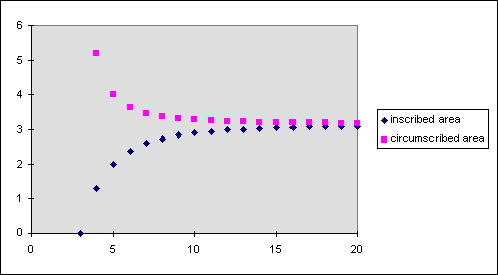
- Have them record in a table the "# of sides" and "area of the Polygon" This can be done with both inscribed and circumscribed polygons (the diameter of the circle can be set by them or they can inspect it by looking in the viewer for the circle object.
- They could try this for different size circles
- Then ask the question: What is the ratio of the area of the Polygon to the Radius squared (how to lead them to this I haven't figured out, suggestions welcome)
- Have them plot their results on graph.
The other possibility is to have them determine the circumference of the circle and then the ratio of that to the Diameter of the circle. They could figure out the Circumference using the Ruler Object within Etoys.
Ways in which you can help:
- Provide a set of suggestion on how to use the Circle Explorer and a GeoBoard (to help kids figure out how to derive Pi
- Provide other activities within Etoys (or other similar tools) and hands on activities that can help facilitate understanding.
- Provide sample lessons and/or a set of lesson plans for these concepts.
- Point me to already created lessons (that I can use as is or use to derive lessons that can be freely distributed under a Creative Commons or similar license).
- Provide a set of "Head Games" they can play in the car to help them become more facile in playing with and manipulating the ideas in their heads. An example of a simple "Head Game" you can play in the car is "Guess My Function" where you ask the kids to give you a number and you can make funny "machine" noises then spit out the answer. Once the kids catch on they will come up with "trick" functions like "YourNumber + 2 * 20 / 20". This can lead to a discussion on equivalent functions, or in kid terms ("Hey you cheated its the same thing!!!")
Screenshots:
Here is a screenshot of the inscribed circles:

Here is a graph showing the results the kids would collect:
Why Etoys?
Etoys is a free educational software tool for teaching children powerful ideas in compelling ways. It works on almost all personal computers and OLPC laptops. Projects created within Etoys can be easily modified by people around the world (for translation into local languages and cultural symbols). Any kid can create their own work. It allows kids (young and old) to make their own models, stories and games. Geogebra may be another good tool, but I need to figure out how the kids can inscribe/circumscribe a circle with Geogebra.
Subscribe to:
Posts (Atom)